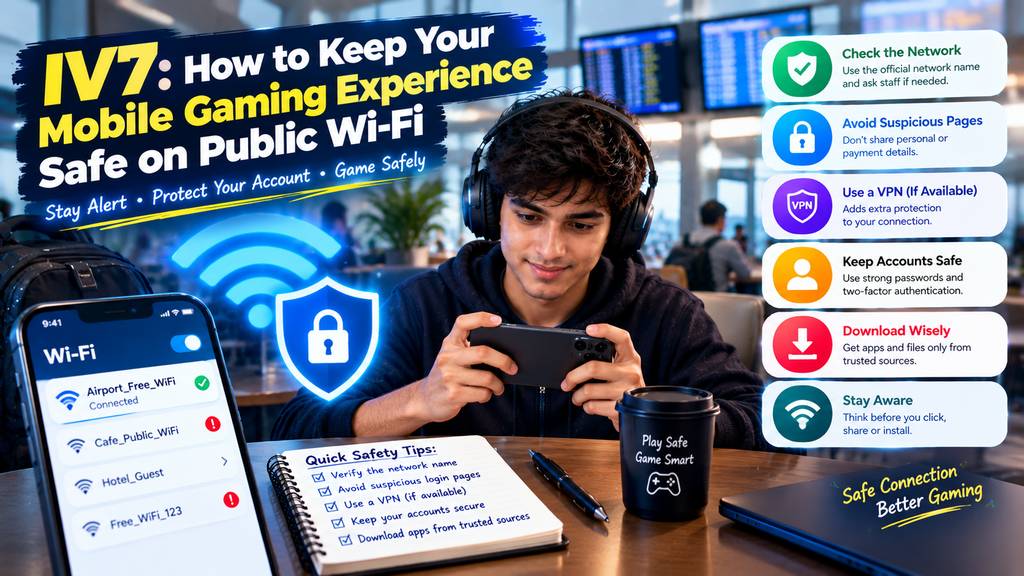
Public Wi-Fi makes it easier to connect to the internet in places such as cafés, hotels, airports, libraries, and shopping centers. It can be useful when mobile data is limited or the phone has a weak cellular signal. However, an unfamiliar network may create privacy and security risks.
People who use mobile applications, including the iv7 game, should understand how public networks work before connecting. A Wi-Fi name that looks familiar does not always belong to the business displaying it. Some networks may be poorly protected, while others may be created to trick users into connecting.
A few careful decisions can reduce unnecessary risks. This guide explains how to recognize suspicious networks, protect personal information, and manage mobile apps more safely when using public internet access.
Understand the Risks of Public Wi-Fi
Public networks are shared by many people. Depending on how the network is configured, information sent through an insecure connection may be exposed to unwanted monitoring.
Not every public Wi-Fi network is dangerous. Many businesses provide legitimate connections. The important point is to avoid treating every available network as trustworthy.
Common risks include:
- Fake networks using names similar to nearby businesses.
- Weak network security.
- Unwanted tracking of browsing activity.
- Suspicious login pages.
- Attempts to collect personal information.
- Unexpected redirects to unfamiliar websites.
Understanding these risks helps you make better decisions before opening an application or entering account details.
Confirm the Network Before Connecting
One of the easiest mistakes is connecting to the first network that appears in the Wi-Fi list. Attackers can create networks with names that resemble those of hotels, cafés, or public venues.
Ask Staff for the Correct Network Name
If a business offers free Wi-Fi, ask an employee for the official network name and any connection instructions.
Do not assume that a network is genuine just because its name includes the business name.
Watch for Unexpected Login Pages
Some public networks require users to accept terms or enter a simple access code. This can be normal.
However, be cautious if a connection page asks for unnecessary information, such as banking details, personal account passwords, or payment credentials without a clear reason.
Close the page if something seems suspicious.
Protect Your Accounts Before Opening Gaming Apps
A public network is not the best place to handle sensitive account information. Before accessing the iv7 game or another mobile service, make sure your account security settings are in good condition.
Use Strong and Unique Passwords
Avoid using the same password across multiple accounts. If one service experiences a security problem, reused passwords can put other accounts at risk.
A password manager can help create and store unique passwords when used correctly.
Enable Extra Account Protection
If an application supports two-factor authentication or another additional security method, consider enabling it.
This adds another layer of protection beyond the password. Keep recovery codes private and never share verification codes with strangers.
Avoid Entering Sensitive Information on Unknown Pages
If a public Wi-Fi connection redirects you to an unfamiliar page, do not enter your gaming login details.
For example, a page claiming that your iv7 apk latest version requires an urgent account verification should be treated with caution. Close unexpected pages and use a trusted source to check application information.
Use Secure Websites and Connections
A secure website connection helps protect information exchanged between your browser and the website.
Before entering personal details, check that the website uses HTTPS and that the domain name is correct.
However, HTTPS alone does not prove that a website is legitimate. Fraudulent websites can also use encrypted connections.
Use these checks together:
- Read the website address carefully.
- Avoid shortened links from unknown messages.
- Do not ignore browser security warnings.
- Check the website’s identity before signing in.
- Avoid entering passwords on unexpected pages.
If a website has spelling mistakes, strange pop-ups, or pressure-based messages, leave it instead of continuing.
Be Careful When Downloading APK Files
Public Wi-Fi can make downloading applications convenient, but an unknown network does not make an unknown file safe.
If you need iv7 apk, check the download source before starting the installation. Avoid pages that use fake download buttons, repeated redirects, or misleading advertisements.
Check the File Before Installation
Before installing an APK, review:
- The source of the file.
- The application name and package details, where available.
- The file size and version information.
- Compatibility with your Android device.
- Permissions requested during installation.
A page advertising the iv7 game apk latest version does not automatically provide an authentic or secure file.
Avoid Rushed Installations
Do not install an application simply because a website says the offer will expire soon. Take time to verify the source and review the installation details.
If you are unsure about a file, do not install it.
Keep Your Phone’s Connection Settings Under Control
A phone may automatically connect to networks it has used before. This can create problems if a network name is copied or reused elsewhere.
Review your Wi-Fi settings from time to time.
Disable Automatic Connection to Unknown Networks
Turn off automatic connection for networks you do not trust. This gives you more control over which network your phone uses.
You can also remove old public networks from the saved list if you no longer need them.
Turn Off Wi-Fi When It Is Not Needed
When you finish using a public connection, disconnect from it. Turning off Wi-Fi when it is not needed can also prevent unwanted automatic connections.
Avoid leaving your phone connected to an unfamiliar network while moving between locations.
Consider a VPN for Additional Privacy
A reputable virtual private network, or VPN, can create an encrypted connection between your device and a VPN service. This may help protect network traffic from local observers on public Wi-Fi.
However, a VPN does not make every online activity safe.
It cannot automatically protect you from:
- Fake websites.
- Harmful application files.
- Phishing messages.
- Weak passwords.
- Unsafe permissions.
- Fraudulent download pages.
Choose a reputable provider and understand its privacy policy. Avoid unknown VPN apps that request unnecessary access to your phone.
Recognize Signs of a Suspicious Connection
Pay attention if your phone or browser behaves differently after joining a public network.
Possible warning signs include:
- Repeated redirects to unfamiliar pages.
- Unexpected requests for account credentials.
- Security certificate warnings.
- Pop-ups claiming your phone is infected.
- Requests to install unknown certificates or applications.
- Login pages that do not match the business.
Disconnect from the network if you notice these signs. Do not follow instructions from suspicious pop-ups.
A Simple Public Wi-Fi Safety Checklist
Before using a public network, review these points:
- Confirm the network name with the business.
- Avoid entering sensitive information on unfamiliar pages.
- Use unique passwords for important accounts.
- Keep your phone’s software updated.
- Disable automatic connections to unknown networks.
- Download APK files only from trustworthy sources.
- Disconnect when you finish using the network.
- Ignore suspicious security alerts from random websites.
These habits can make everyday internet use more controlled without requiring complicated technical knowledge.
Final Thoughts
Public Wi-Fi is convenient, but convenience should not replace basic security. Always confirm the network, protect your accounts, and avoid sharing private information through unfamiliar pages.
If you use iv7, take the same care when accessing your account or downloading an application. Before installing iv7 apk latest version, verify the source rather than trusting a public Wi-Fi login page or an advertisement.
Safe mobile use comes from several small decisions. A trusted network, secure account settings, careful downloads, and awareness of suspicious activity can help protect your phone wherever you connect.
Frequently Asked Questions
1. Is public Wi-Fi safe for mobile gaming?
It depends on the network and how it is configured. Use a verified network, avoid entering sensitive information on unfamiliar pages, and disconnect if you notice suspicious activity.
2. Can someone steal my password through public Wi-Fi?
Insecure networks can expose users to certain monitoring and interception risks. HTTPS, unique passwords, and additional account protection can reduce these risks.
3. Should I use a VPN while playing the iv7 game?
A reputable VPN may add privacy by encrypting network traffic between your phone and the VPN service. It does not guarantee protection from phishing, harmful downloads, or account theft.
4. Is it safe to download iv7 apk on public Wi-Fi?
The network and the file source are separate concerns. Use a verified network and download the APK only from a trustworthy source. Review the file before installation.
5. How can I identify a fake public Wi-Fi network?
Ask the business for its official network name. Be cautious of similar names, unexpected login pages, and requests for sensitive personal information.
6. Should I turn off automatic Wi-Fi connections?
Yes, especially for networks you do not recognize or no longer use. Manual connection gives you better control over which network your phone joins.
7. Does iv7 game apk latest version need public Wi-Fi to work?
Not necessarily. Download requirements depend on the source and the application’s distribution method. A trusted internet connection is more important than using public Wi-Fi specifically.